
Shopify app
Checkout rules you test before they go live.
Cartnorm Checkout Rules hides, renames and reorders payment methods and delivery options, and stops checkout with a clear message when you can’t ship an order. Try each rule on a sample customer before real buyers see it.
The app is in review for the Shopify App Store. Leave your email and we will write once it is live.
How it works
Live in three steps
1
Pick a ready-made rule
Start from one of 14 rules such as “Cash on delivery only at home” or “House number required”, or build your own. Adjust names and amounts.
2
Test it as a customer
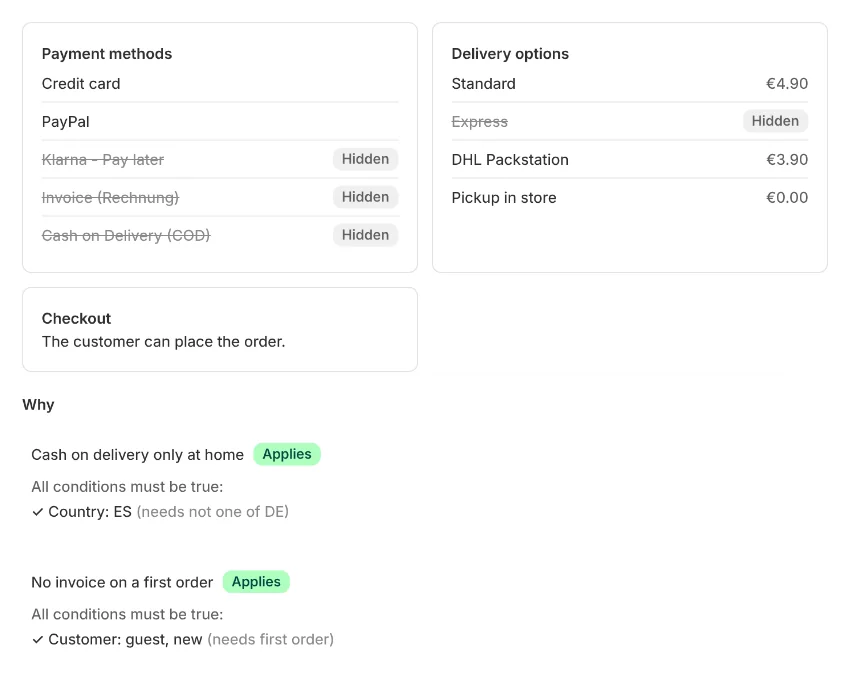
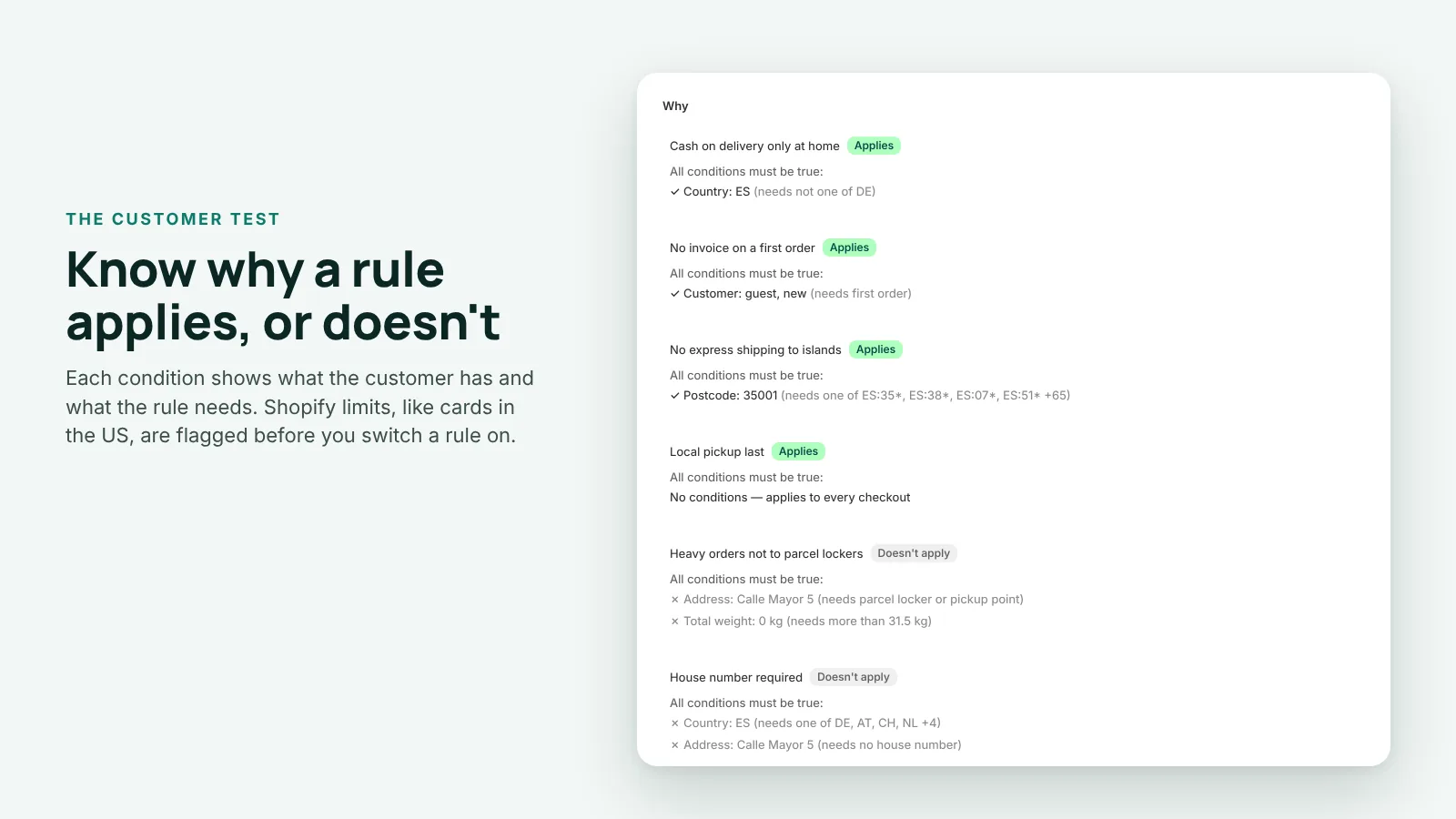
Enter an address, a cart and a customer type. See which payment and delivery options remain, what is hidden or renamed, and why.
3
Switch it to Live
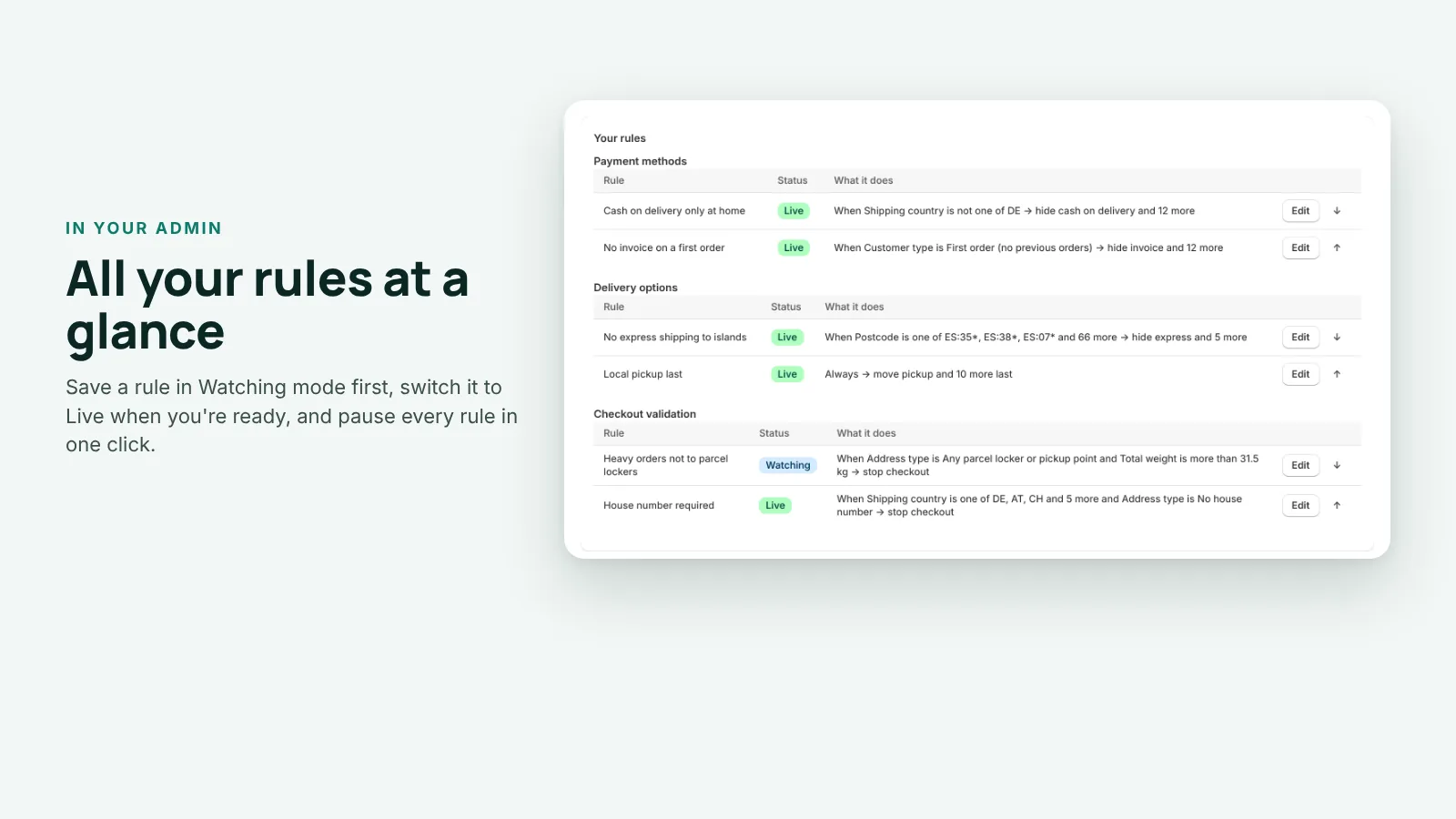
Save the rule in Watching mode first. When the test looks right, switch it to Live and it applies at checkout.
Features
Control what customers can choose at checkout
Payment methods
Hide cash on delivery for orders going abroad, or invoice and pay-later on a first order. Rename a method or move it up or down the list.
Delivery options
Hide, rename or reorder delivery options, or sort them by price. Put local pickup last and the cheapest option first.
Stop checkout with a message
Block orders to PO boxes, heavy orders to parcel lockers, addresses without a house number or carts below a minimum value. The customer sees your message.
Conditions that fit how you ship
Country, region, postcode, currency, checkout language, subtotal, number of items, total weight, products, collections, product tags, customer tags, customer type and address type. Match all of them or any.
Postcodes the way carriers think
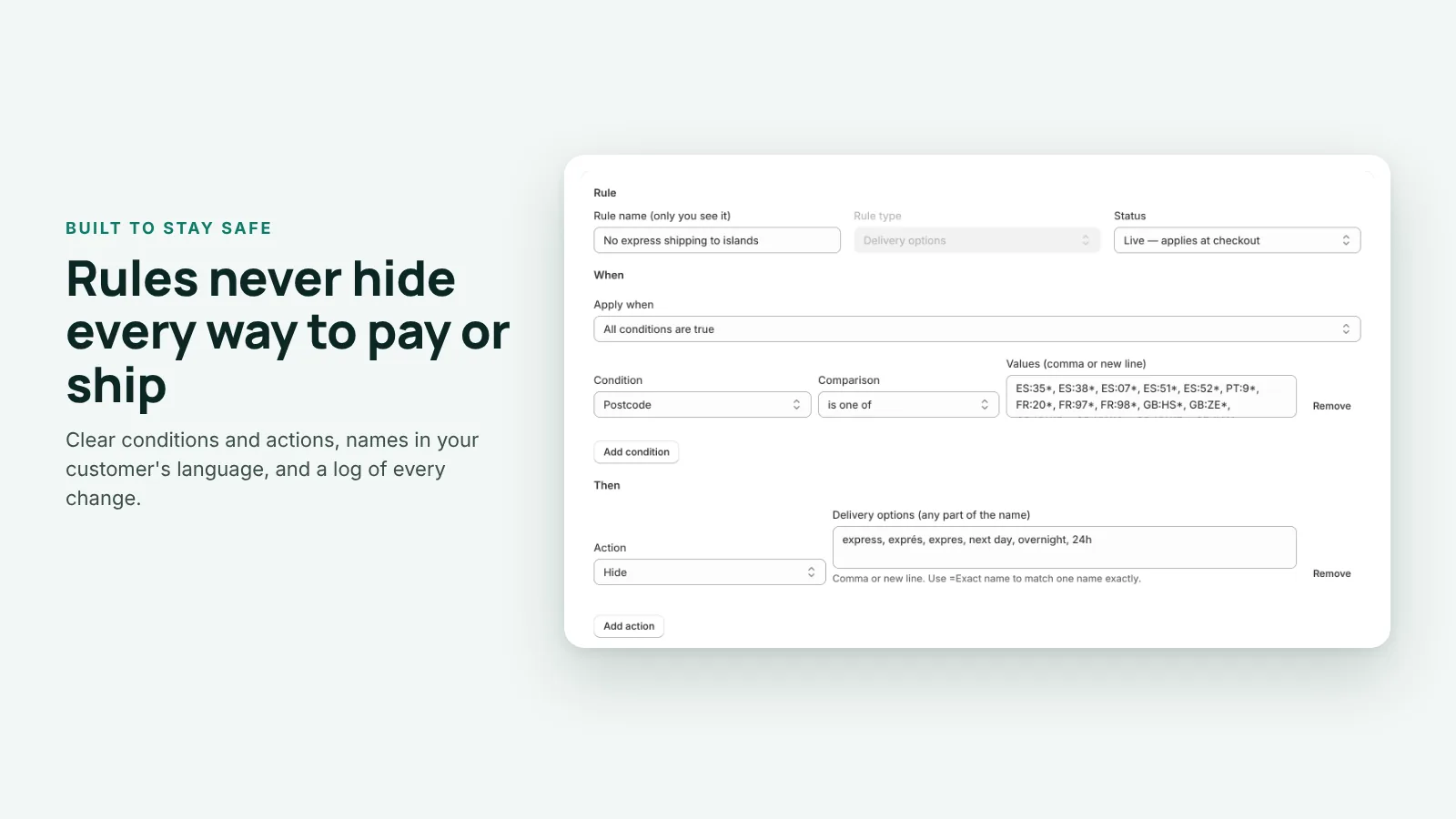
Use prefixes, ranges or country-scoped codes like ES:35* for the Las Palmas province of the Canary Islands. The ready-made island rules come with the postcode lists filled in.
Messages in 7 languages
The ready-made rules include customer messages in English, German, French, Spanish, Italian, Dutch and Polish.
Ready-made rules
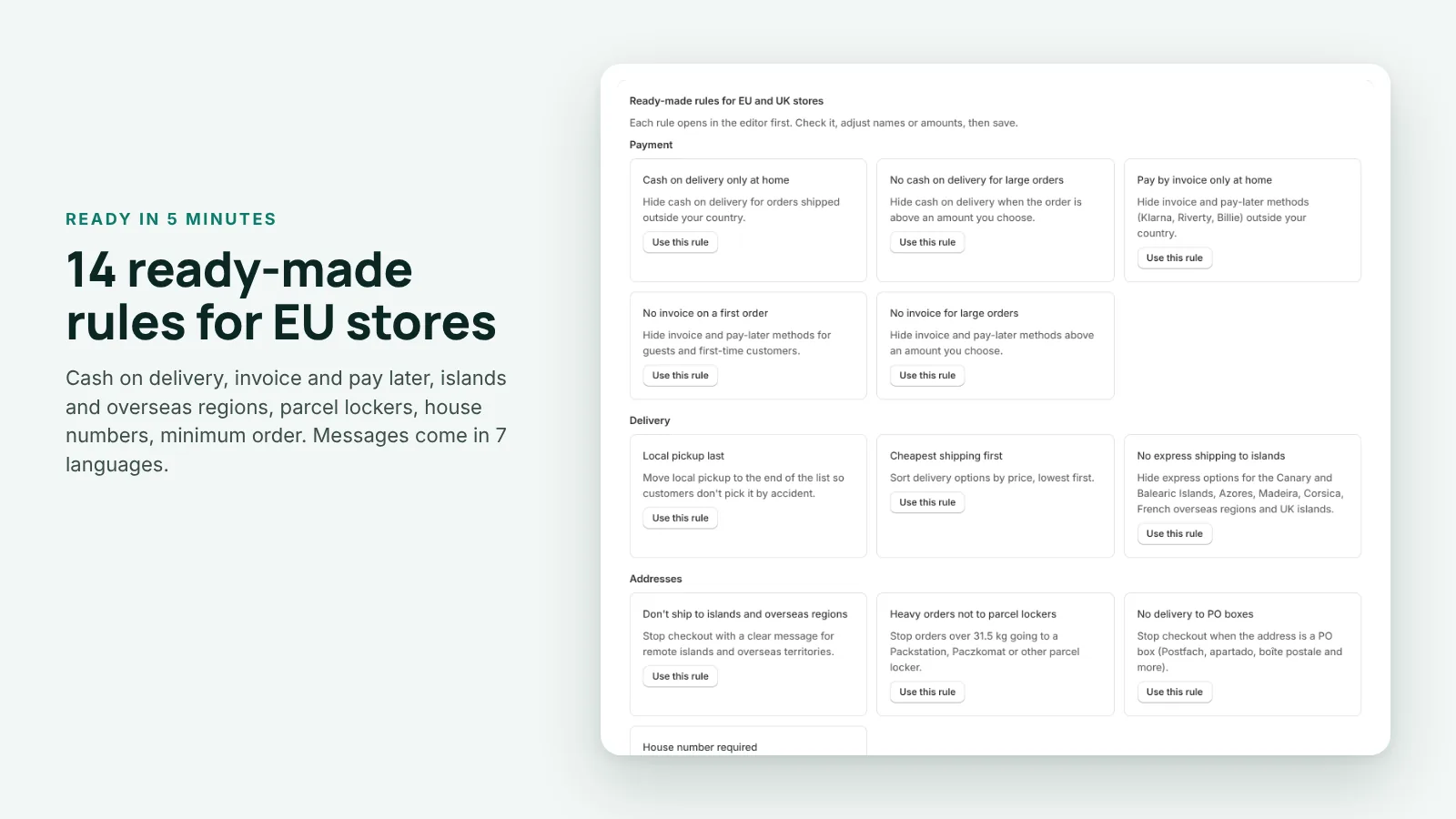
14 rules for EU and UK stores
Each one opens in the editor first, so you can check it and adjust names or amounts before you save.
Payment
Cash on delivery only at home
No cash on delivery above an amount
Invoice and pay-later only at home
No invoice on a first order
No invoice above an amount
Delivery
Local pickup last
Cheapest shipping first
No express shipping to islands (Canary and Balearic Islands, Azores, Madeira, Corsica, French overseas regions, UK islands)
Addresses and orders
Don’t ship to islands and overseas regions
Heavy orders (over 31.5 kg) not to parcel lockers
No delivery to PO boxes
House number required (DE, AT, CH, NL, BE, LU, PL, CZ)
Minimum order value
Some products only ship at home (product tag “domestic-only”)
Test as a customer
See what a customer gets, and why
Enter an address, a cart and a customer type. The test runs the same rule engine as your checkout.
What the test shows
Which payment methods and delivery options remain
What is hidden or renamed, and in what order the rest appear
Whether checkout is stopped, and with which message
For every rule: each condition, what the customer has and what the rule needs
Works on unsaved changes, straight from the rule editor
Shopify limits it warns about
- Card payments can’t be hidden for buyers in the US and Canada unless the store is on Shopify Plus.
- Shop Pay, Apple Pay and Google Pay can’t be renamed or reordered.
- Guests have no customer tags, so tag conditions never match them.
- A rule would hide every payment method or every delivery option.
Built to stay safe
Your checkout keeps working
Never hides everything
Rules never hide every payment method or every delivery option. The customer always has a way to pay and a way to receive the order.
Watching mode
A Watching rule is saved but not applied. Keep as many as you like and test them before they reach real buyers.
Pause all rules
One click stops every rule at checkout. Switch them back on when you are ready.
Activity log
Every change to a rule is logged with its time, so you can see what changed and when.
Orders keep flowing
If the checkout check itself fails, it lets the order through instead of blocking it.
Screenshots
In your Shopify admin
Pricing
Start free, upgrade when you need more rules
Every feature is in both plans. The only difference is how many rules can be live at once.
Free
For a few key rules
$0
Every feature included.
Get notified at launch3 live rules
All 14 ready-made rules
The customer test
Messages in 7 languages
Unlimited rules in Watching mode
Pro
For every rule you need
$9.99 / month
14-day free trial.
Get notified at launchUnlimited live rules
Everything in Free
Billed by Shopify on your Shopify invoice
Uninstall any time, billing stops
Prices in USD. Shopify bills the Pro plan on your regular Shopify invoice. Full terms: Terms, section 4a.
Questions
Can I hide credit card payments?
In most countries, yes. For buyers in the US and Canada, Shopify only lets apps hide card payments on Shopify Plus stores. The customer test warns you when a rule runs into this limit.
Can I rename Shop Pay, Apple Pay or Google Pay?
No. Shopify doesn’t allow apps to rename or reorder these. The customer test points this out when a rule tries to.
Will a rule ever leave a customer with no way to pay or ship?
No. Rules never hide every payment method or every delivery option, and the customer test warns you when a rule would.
What if something goes wrong at checkout?
Use Pause all rules to stop every rule in one click. Checkout checks are built so that if the check itself fails, the order goes through rather than being blocked.
Is it only for EU stores?
The ready-made rules are written for EU and UK stores. You can build your own rules for any country with the same conditions.
Does my customers’ data go through your servers?
No. Rules run inside Shopify’s checkout as Shopify Functions. The customer test uses only the details you type in. See our privacy policy for what the app stores.
How am I billed?
Shopify bills you on your regular Shopify invoice. The Free plan has 3 live rules. Pro is $9.99 a month with a 14-day free trial and unlimited live rules.
What happens if I uninstall?
Your rules stop applying at checkout and billing ends. Access tokens are deleted right away and all your shop data 48 hours later, as Shopify requires.
How do I get help?
Read the setup guide or write to [email protected]. We answer every message.
New here? Start with the setup guide. What the app stores: privacy policy.
Offer the right ways to pay and ship
The app is in review for the Shopify App Store. Leave your email and be first to try it.